If you run into any issues, open a GitHub issue in the meetup-8 repository.
Start with the business question
Everything here starts from a question someone in the business asked, not from the data or the tools.
The question (fictional): a consultancy is about to advise a client on adopting or upgrading a data-platform stack: Iceberg, Arrow, Kafka, Airflow, Flink. Before giving that advice, an engineer has to read what the developers of those projects discuss in public: breaking changes, deprecations, regressions. That is a year of five mailing lists, about 21,600 messages. Nobody can read all of it.
Build a data product that answers it
You are the bridge between the person asking and the data. You answer them by building a data product: data turned into something a person can use to make a decision, that they can trust, and that someone owns.
Turn the question into a KPI
A question is not yet something you can compute. To get there:
- Understand what they actually need. Here: what should the engineer read first, and what will it cost?
- Formulate it with the data you have. Here: unique messages, per list and per month, that mention the topics that matter.
- Clarify, or use a proxy where you cannot measure the real thing. Nobody can measure “relevant” directly, so keywords (
breaking,deprecated,regressionand so on) stand in for it. Cost becomes review hours at an assumed reading rate.
So the KPI is: which lists and months to read first, how many unique messages that is, and how many hours it costs. Now we know what to build.
Start with the end in mind
You get there with two Jobs and one person in between: Job 1 lands the data and verifies it, you look at the result, and Job 2 processes it and checks it.
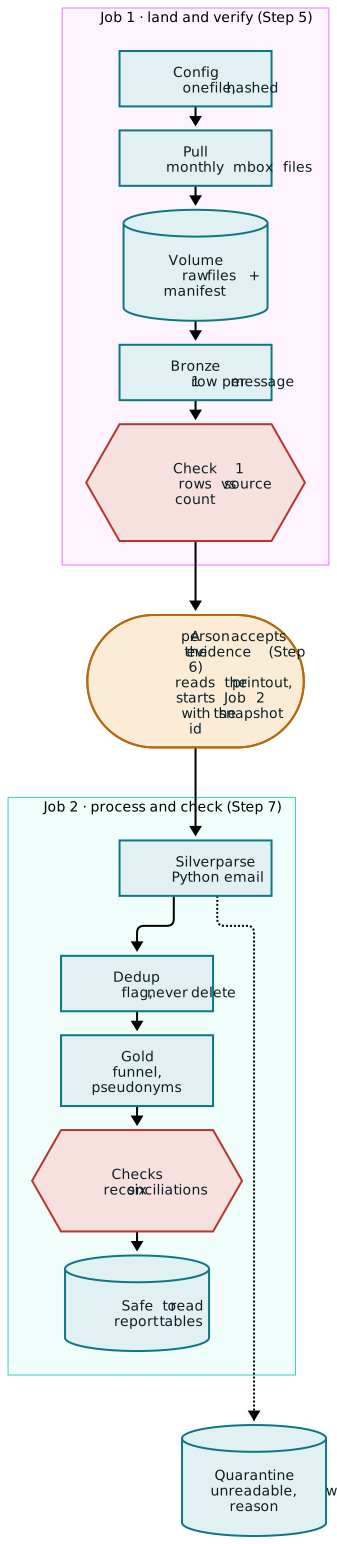
- Teal: the machine does it (provable).
- Amber: a person decides.
- Red: a check that can stop everything.
The full diagram, with every table and count, is in architecture.md.
How to read this guide
The goal is the big picture: what each stage does and why it is there. You do not need to read the notebooks line by line to follow along. Boxes marked Observe are the point of the course. Each one shows where a principle from the talk lives in the data product, and is tagged with it:
- Be 50/50: half software engineer, half data scientist
- Auditability saves you: every number can be traced back to the data that made it
- Know your worth: put a number on what you deliver, and on what it costs
- Be the bridge: stand between the business and the data, and own the decisions
Do not skip them to get to green faster.
Running time: a few minutes per Job (Job 2 took 4 min 33 s on the author’s run). Building and reading take longer.
Requirements
- A Databricks Free Edition account (free, any email)
- A GitHub account, only if the repo is private
- Turn a business question into a KPI you can compute, using a proxy where you cannot measure the real thing
- Land raw data with a manifest that records exactly what arrived and when
- Parse data into one row per record, setting aside what cannot be read with a reason instead of dropping it
- Flag duplicates without deleting them
- Gate a pipeline on reconciliation checks and on a person’s decision before anyone reads the answer
- Put a number on what you deliver, and label which parts are assumptions
Step 1: Accounts and the repo
- Sign up for Databricks Free Edition with any email. Free Edition is serverless only, allows outbound internet to a list of trusted domains, and is for non-commercial use.
- In the workspace tab, open Workspace, then Create > Git folder, and paste the repo URL:This clones the notebooks and the config into your workspace. If the repo is private, Databricks asks you to link a GitHub account first (Settings > Linked accounts).
Observe · Be 50/50
The code and configuration are versioned on Git. This is the 101 course of recovering as a Data Scientist.
Step 2: Read the config before running anything
Open config/pipeline.json. Everything that is a setting lives here, and nowhere else:
listsandwindow: which mailing lists and which months to pullsource.pause_seconds: how long to wait between calls (be polite to the source)dedup.min_body_chars: bodies shorter than this are never treated as duplicatesbronze.exceptions: gaps a person has reviewed and acceptedgold.keywords,gold.scope_months,gold.review_rates_docs_per_hour: the judgement calls behind the report
Observe · Be the bridge
Look at the gold section. Keywords, scope months and review rates are not facts about the data. They are decisions, and they sit in config so anyone can see and change them.
We want to use our data to drive decisions. But we cannot drive decisions we can trust if nobody can see the decisions that shaped the data.
Step 3: Run 00_setup_and_config
Open the notebook and run all cells. It validates the config, prints a SHA-256 hash of it, and creates the schema and the volume if they do not exist.
Observe · Be 50/50
Note the config hash it prints. Now break the config on purpose: set "pause_seconds": 0.1 and run again. The notebook stops with a message that names the exact setting, before any data moves. Put the value back.
This is an API, not a static CSV. That means we need to version each snapshot, and that we need to be polite to it!
Run the notebook a second time with no changes. Nothing breaks and nothing is duplicated. Every step in this project is safe to re-run (IF NOT EXISTS, files that exist are skipped).
Step 4: Create the salt (one-off)
Gold replaces each claimed sender with a pseudonym: an HMAC-SHA256 of the address with a secret key (the salt). The salt never goes in the repo. You create it once, in a new notebook of its own:
- In Workspace, open your home folder (not the Git folder), then Create > Notebook. Keeping it outside the Git folder means it can never be committed.
- Paste the snippet below into the first cell and run it. It should print one line.
- You can delete the notebook afterwards. The salt stays in the workspace’s secret store.
import secrets
from databricks.sdk import WorkspaceClient

w = WorkspaceClient()
w.secrets.create_scope(scope="email_forensics")
w.secrets.put_secret(scope="email_forensics", key="pseudonym_salt",
                     string_value=secrets.token_urlsafe(32))
print("Salt created (value not printed)")
The scope and key names must match gold.salt_secret_scope and gold.salt_secret_key in the config.
Observe · Be 50/50
The config holds the names of the secret, never the value. Gold refuses to run if the salt is missing or shorter than 16 characters, and it reports only the error type.
Step 5: Build Job 1: land and verify
In Jobs & Pipelines, choose Create > Job. A Job is a set of tasks that run in order. Add two tasks. For each one: set Type to Notebook, pick the notebook from your Git folder under Path, leave Compute on Serverless, and add any parameters under Parameters.
The task name must be exactly pull. The pull publishes the new snapshot_id as a task value, and Bronze reads it from the task with that name.
Click Run now (top right).
Watching a run. Open the Job’s Runs tab and click the run. You see the tasks as boxes, coloured as they finish. Click a task to see its notebook output: everything it printed, cell by cell. This is where you read the printouts in the Observe boxes below.
Observe · Auditability saves you
Open the volume and find your snapshot folder. A volume is a folder for files (not tables) that lives inside the catalog, next to your tables, so the raw files sit under the same name and the same permissions as the data made from them. To get there: in the left sidebar open Catalog, then workspace > email_forensics > Volumes > raw, and open the folder named after your snapshot_id. You will see:
pull_params.json: what was asked for, including the full config and its hashmanifest.json: what actually landed, one row per file with its SHA-256stats/: what the source says it has, per monthmbox/: the raw files, untouched
“What arrived” is now a fact on disk, not a memory. Auditable. This prevents unnecessary war stories.
Observe · Auditability saves you
Read the Bronze printout. Three independent counts are compared for every file: the source’s own count, the number of From separator lines in the file, and the rows Bronze wrote. Check 1 passes only if no file has fewer rows than the source says it should.
Copy the snapshot_id from the printout. Your counts will differ from the author’s (about 21,600 messages across 60 files), because the archive keeps changing. That is exactly why every run is tied to a snapshot_id.
If Check 1 fails
This happened on my first snapshot: One file was 2 messages short of the source count, cause unknown. The fix is not to re-pull until it goes green. A person looks at the gap, decides whether it is acceptable, and records the decision in config:
"bronze": {
  "exceptions": [
    {"file": "<file name>", "accepted_shortfall": 2, "reason": "<what you found and why you accept it>"}
  ]
}
Commit it, pull the change into your Git folder, and repair the run so only bronze re-runs.
Observe · Be the bridge
The machine found the gap. Only a person can decide whether it matters. The decision is named, bounded (2, not “some”) and in git, and Bronze prints it on every run.
Step 6: The human gate
Job 1 does not start Job 2. You do. Job 1 green means a person has accepted the evidence. Copying the snapshot_id by hand is the gate.
Observe · Be the bridge
A Job can only pass or fail. Somebody has to decide where a person must look before the next step starts. This project puts that person between landing the evidence and deriving anything from it.
Step 7: Build Job 2: process and check
Create a second Job the same way, this time with a Job parameter.
- Add the Job parameter. A Job parameter belongs to the whole Job, not to one task. In the panel on the right of the Job page, find Job parameters and add one with the key
snapshot_id. Leave its default value empty. - Add the four tasks. Each one passes the Job parameter on with the value
{{job.parameters.snapshot_id}}: - Run it with your snapshot. Open the arrow next to Run now and choose Run now with different settings. Paste the
snapshot_idyou copied into thesnapshot_idbox and click Run.
The default stays empty on purpose. You give the snapshot each time you run, so a run is never on a snapshot you did not choose.
Observe · Auditability saves you
In the silver output, find the quarantine counts. On the author’s snapshot, 30 of 21,634 messages could not be parsed, mostly HTML-only messages with no readable text. They were not dropped: they sit in silver_quarantine with a reason code (no_text_plain, empty_text_plain or parse_error), and parsed + quarantined = Bronze (Check 2).
Observe · Auditability saves you
In the dedup output, see how many rows were flagged as duplicates (65 on the author’s snapshot). They were flagged, not deleted. Every copy and every location is still there, so the definition of “duplicate” can change later without losing anything.
Observe · Auditability saves you
Query the results of the last task. In the left sidebar open SQL Editor, then Create new query. In the compute dropdown at the top, pick Serverless Starter Warehouse. Paste the query, put in your snapshot_id, and click Run:
SELECT check_name, passed, detail
FROM workspace.email_forensics.check_results
WHERE snapshot_id = '<your snapshot_id>'
ORDER BY check_name;
Six rows, six passes. Only now is Gold safe to read.
Observe · Know your worth
Now read the answer to the business question. In the same SQL Editor:
SELECT metric, value, rate, note
FROM workspace.email_forensics.gold_kpis
WHERE snapshot_id = '<your snapshot_id>'
ORDER BY metric;
review_set_size is how many messages the engineer has to read, and review_hours is what that costs at 50 and at 100 messages an hour. hours_avoided_by_dedup is the time saved by not reading the same message twice. estimated_cost is empty on purpose: only the business can tell you what an hour of an engineer costs. Every row carries a note, and the review rates say “assumed rate, not a benchmark”.
Putting a number on the “so what” is how you show your worth. Labelling which parts are assumptions is how that number stays honest. For which lists and months to read first, query gold_cell_summary ordered by priority_rank.
Step 8: Make it fail on purpose
Run Job 2 again, this time with snapshot_id empty: choose Run now with different settings as in Step 7, clear the snapshot_id box, and click Run. The silver task stops at once with “snapshot_id is empty inside a Job”, and nothing after it runs.
Observe · Auditability saves you
A pipeline that guesses (“use the newest snapshot”) would have gone green on the wrong data. This one refuses to guess inside a Job. Failing loudly and early is a feature.
Step 9: Compare the two ideas of “the same message” (optional)
Job 2 decided that two messages are the same when their subject and body match (a content hash). Most people would reach for a different key: every email carries a Message-ID header that is supposed to be unique. This step checks whether the two definitions agree on this data.
Open 31_dedup_compare from your Git folder and click Run all. It is not part of either Job, and it does not change any existing table. It reads the Silver tables for one snapshot, puts both definitions side by side, and writes one small report table, silver_dedup_compare, one row per metric. After the first run a snapshot_id box appears at the top of the notebook: leave it empty to use your newest snapshot, or paste a snapshot_id and run again.
Observe · Be 50/50
On the author’s snapshot the two disagree. 25 copies are caught by both, 40 only by content, 3 only by Message-ID, and in a few cases the same Message-ID joins different text. A key everyone trusts is wrong some of the time. Both rates are reported side by side and never mixed.
Step 10: Troubleshooting
Further Reading
- Fundamentals of Data Engineering, Joe Reis and Matt Housley
- Get Started with Azure Databricks (opens in a new tab)